Neo 0.1.4 keeps region labels coming
Region labels that don't run out, labels on quoted posts, a tidier photo viewer, themed search, and a new layout for the settings page.
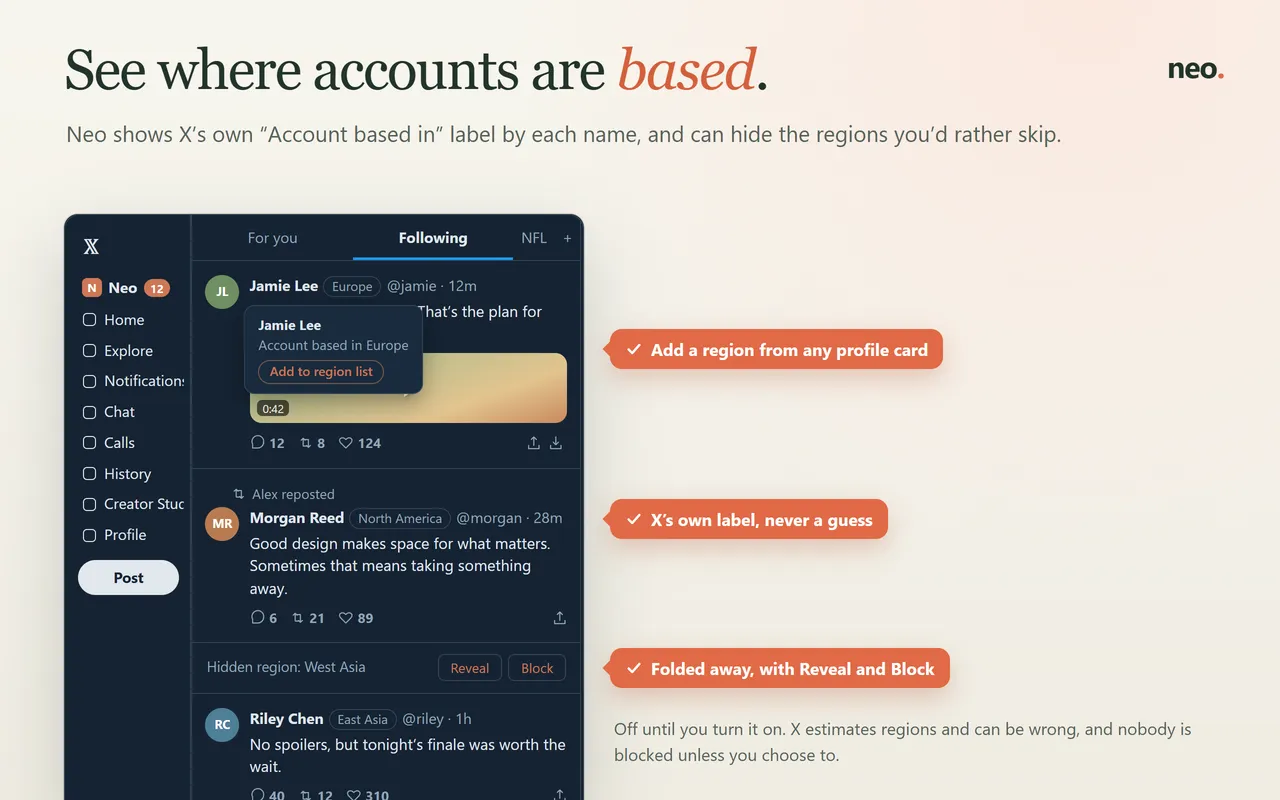
Version 0.1.4 is mostly about account regions, plus a few places on X that Neo used to skip.
Region labels that don't run out
X allows 50 account lookups every 15 minutes, and its own About pages draw on the same allowance. Neo used to spend all of it, so labels stopped appearing and X's About page showed an error. Neo now stops while a fifth of the allowance is left, and after X says to slow down it waits until X's reset time instead of trying again every minute.
- Quoted posts get labels too. X draws a quoted post's name without a link, so Neo used to skip it. Neo now finds the quoted author from the avatar. A quoted author gets a label only: auto-block still acts only on the people who wrote the posts themselves.
- Labels on replies can be turned off. A new switch under Show account regions. Turn it off and the replies under a post get no labels and use no lookups. The post you opened and the conversation above it keep theirs.
- Settings say what to expect. Choosing After names or Both now explains the limit: new labels can pause for up to 15 minutes while you scroll. In hover cards uses one lookup per card.
Replies beside an opened photo
Click a post's photo and X opens it large, with the post and its replies in a panel beside it. Neo used to leave that panel alone. Now it works like a post's page: muted words, accounts, and regions hide replies there, your reply order applies, and the panel takes your theme.
Smaller things you'll notice
- Search matches your theme. Explore's search box and the suggestions under both search boxes no longer stay in X's black.
- A new layout for Neo's settings. Pick New at the bottom of the menu (or in the top bar) for a sidebar, one page per section, and an Overview that shows whether Neo is on, what it filtered this session, and quick switches. Classic stays the default, and nothing changes on X either way.
Getting it
0.1.4 is on the Chrome Web Store. Chrome updates Neo by itself, so there's nothing for you to do. The download on this site has it as well.